
Read a wall of text
like an ebook.
Long messages arrive in a chat bubble as one unreadable wall of text. LongText turns that same text into an ebook you actually finish — tap or swipe page by page, pick up where you left off, change the text size and theme.
Compose in Messages, read like a book — recipients don't need the app.
Open a Private Link here and read it like a book — nothing to sign up for, nothing to install.
Coming to the App Store
Why not email?
Because email is no longer where our conversations live. Our inboxes are buried under spam, newsletters, school announcements, receipts, login links, and one-time codes from banks and everything else. And do you even know your friend's email address? LongText starts in Messages, where the conversation already is, then gives the long part room to breathe.
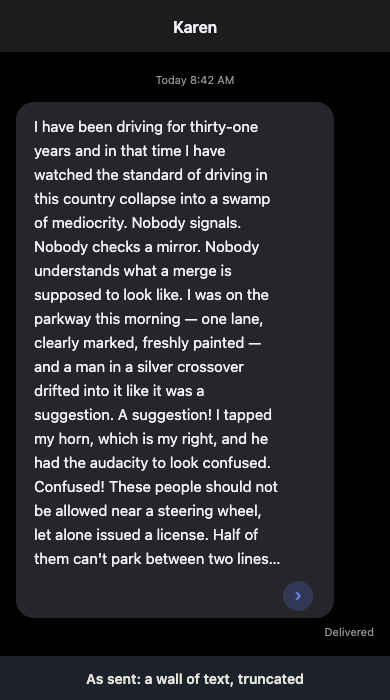
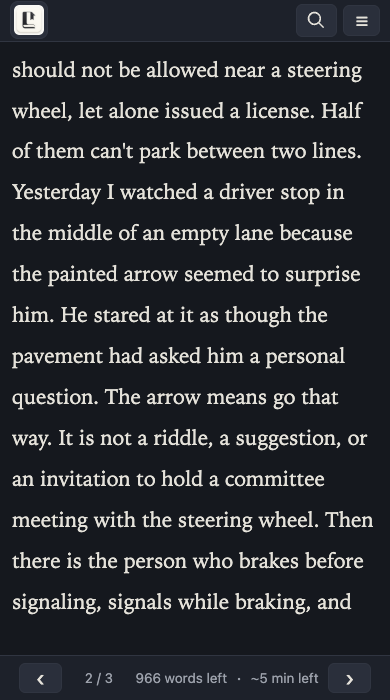
Before and after
The same message, as it arrives in a chat bubble — and as pages in LongText.
How LongText works
Content-blind by design
Encryption happens on the sender's device before anything leaves it. The service stores ciphertext plus operational metadata and an optional public preview of title, word count, and read time; the web reader trusts the JavaScript delivered for that read.
Expiration you choose
7 days, 30 days, 1 year, or forever. Expiry removes the ciphertext and preview metadata, keeps a metadata-only marker for 90 days so readers see “This document has been deleted,” then removes that row too. It prevents future fetches, but it cannot recall content that was already opened, copied, forwarded, screenshotted, or backed up.
No accounts
Nothing to sign up for, nothing to log into. A message is just encrypted bytes with a countdown.
Read anywhere
The web reader runs in any modern browser — recipients don't need the app. On iPhone, compose in Messages and read in the native LongText reader.
FAQ
What is LongText?
LongText is a way to send the long parts of a conversation. You compose a long message in Messages, and instead of dumping it into one giant chat bubble, it arrives as a private link that opens into a comfortable, paged reader. The recipient doesn't need an account or the app — a link is enough.
Does the recipient need the app?
No. The private link opens in any modern web browser and renders with the same LongText reader. The app's value is composing comfortably in Messages and reading in a native, offline-friendly reader on iPhone.
How do I send one?
Compose in the LongText Messages extension, choose how long the message should last, and tap Insert. One private link lands in the conversation. Anyone you share that link with can open it until it expires or you delete it.
How long is it available?
You choose at compose time: 7 days, 30 days, 1 year, or forever. Retained content is also removed if you delete the document; after deletion the service keeps only a metadata marker for 90 days so readers can show “This document has been deleted.”
Who can open a private link?
Anyone holding the link. LongText has no accounts, no identity binding, and no read receipts, so it cannot tell you who opened the message or take the link back once it has been shared. Treat a link like you would a physical letter: share it only with people you trust.
Privacy
Can LongText read my message?
No — and it can't prove that to you, so think of it as “content-blind”: encryption happens on the sender's device with a fresh key that never leaves the link. The service stores ciphertext, so the words themselves are not readable without the key in the link. The server still sees operational metadata about the request.
What does the service store?
Ciphertext plus operational metadata (timing and size, for example), and optionally the public preview metadata you saw at compose time: title, word count, and read time. The decryption key stays in the URL fragment and is never sent with requests. Full details are in the Gory Details section below.
Is the title private?
The title (and word count and read time) can be used as public preview metadata so Messages and link previews can show it before the document is opened. If you want the title to stay private, leave it out. The body is always encrypted; only what you add as preview metadata is public.
What if the link is forwarded or lost?
A forwarded link works exactly like the original — anyone holding it can read and forward it again, and LongText can't tell who opened it. If a link is lost and the message is important, ask the sender to share it again. There is no key recovery and no account to reissue access from.
Does deletion recall a message?
No. Deleting (or expiring) a document removes it from the service so it can no longer be fetched, and readers see “This document has been deleted.” It cannot reach into devices already opened the message: anything that was copied, screenshotted, forwarded, or backed up is outside LongText's control. Encryption protects content in transit and at rest — it isn't digital ink that erases itself.
Is the native app different from the web reader?
Both readers decrypt the same content with the same key and render the same plain-text or Markdown formatting. The web reader is code delivered by the server for each read and runs under a strict policy with no third-party requests; the native app is installed software. Both trust their own code delivery — that's the honest limit of client-side encryption.
Gory Details
How is the encryption actually structured?
Each document gets a fresh 32-byte AES-256-GCM key and 12-byte nonce generated on the sender's device. The Additional Authenticated Data is the constant LongText|v1|<document id>, which binds ciphertext to one document. The payload travels in the LRD1 envelope (flags, nonce, ciphertext, GCM tag).
Where does the key live?
Only in the URL fragment — #v=1&k=…&p=plain|markdown — which browsers never send to servers. On load the reader stores the key in the current tab's sessionStorage and scrubs the fragment from the address bar, so the key never appears in history, referrers, or server logs. The reader page is served under a strict Content Security Policy and loads no third-party scripts or resources. Closing the tab discards the key with the session.
What does the server see?
Operational metadata: when requests happen, their size, their timing, and the IPs they came from. It also holds the optional title/word/read-time preview data and a deletion marker for up to 90 days after deletion. Metadata lives in SQLite; ciphertext sits in a local cache and object storage. It never sees the key, and it never decrypts.
Who could still break this?
The realistic limits: bearer links can be forwarded (there is no authentication or key recovery); a compromised device can capture anything the user reads; traffic metadata reveals who talks to whom and when; and a storage compromise of the web reader's code delivery could change what future web reads do. Full infrastructure compromise does not reveal stored plaintext without a link key, but it can compromise metadata, integrity, availability, and future web reads.